Changed the format again?

Is there a way to opt out of getting an email every day for the forum's daily activity - get too many emails already - I already went into my profile and un-checked "Receive forum activity newsletter - Daily" and SAVED - but it defaults back to being checked after saving - Thanks

Well I just found where I can change the frequency to monthly instead of daily but you cannot opt out.....but at least now only one email per month instead of daily.
 
Last edited:
Is there a way to opt out of getting an email every day for the forum's daily activity - get too many emails already - I already went into my profile and un-checked "Receive forum activity newsletter - Daily" and SAVED - but it defaults back to being checked after saving - Thanks

Well I just found where I can change the frequency to monthly instead of daily but you cannot opt out.....but at least now only one email per month instead of daily.

At the bottom of the newsletter there is Unsubscribe. Do that.
 
I had a problem using my old saved favorite to log in (got an error message) so I deleted that favorite, typed in the url again , and then saved that. It worked perfectly then. I also just figured out that it had the bold turned on so this edit changed it back.
 
One thing I dislike is not being able to "Preview" a post before
adding it to the thread. I've caught several errors in my posts
by being able to preview them.
It threw me at first, as well LOL It's because the typed post looks exactly as it will look when posted. When you preview the post it looks the same. In the past it looked different.
 
One thing I dislike is not being able to "Preview" a post before
adding it to the thread. I've caught several errors in my posts
by being able to preview them.

1647549835233.png


That may help.
 
Yes, it does. The main difference is that mine does not say Preview.
Once you do a cursor over a tag shows up that says preview.
Thanks!
Are you on a phone or laptop? That may be the difference.
 
Are you on a phone or laptop? That may be the difference.
Actually, on a desktop. - - - Just found one other thing, How do I edit a previous post?
I found one of mine with a spelling error and would like to correct it. - - -
'nuther question: How do I delete one of my posts? - - That's an option
if I can not edit it.
- - - Thanks!

THIS is frustrating: This thread I CAN edit my post, but in another one I can not.
 
At this time, the editing as single post deletion is 1 day. So if longer than one day those abilities go away.
If you are past that time, please report the post and let a mod fix it for you.

I am still working with mods and R13 to find out some of the old settings and such things.
 
That is under discussion. At this time it is where you cannot see it logged out. So, please just stay logged in and you'll see them all the time.
 
I don't like the "reply" feature at all....... The previous version was better.... prettier isn't always better..... Just ask Samson.......
 
I don't like the "reply" feature at all....... The previous version was better.... prettier isn't always better..... Just ask Samson.......
Out of curiosity, what is it that you don't like? Is it due to being on the right side of the post?
 
"Out of curiosity, what is it that you don't like? Is it due to being on the right side of the post?"

I can't seem to find a preview option... which I liked a lot..... and the emoji menu seems to have gone away.... I don't get much online time... so when things change, I don't have time to re learn things... the "first" change, was fine...
this one... not so much......
 
I don't get much online time... so when things change, I don't have time to re learn things...
I certainly understand this. If you don't have much time, it's hard to re learn where all the different buttons are.


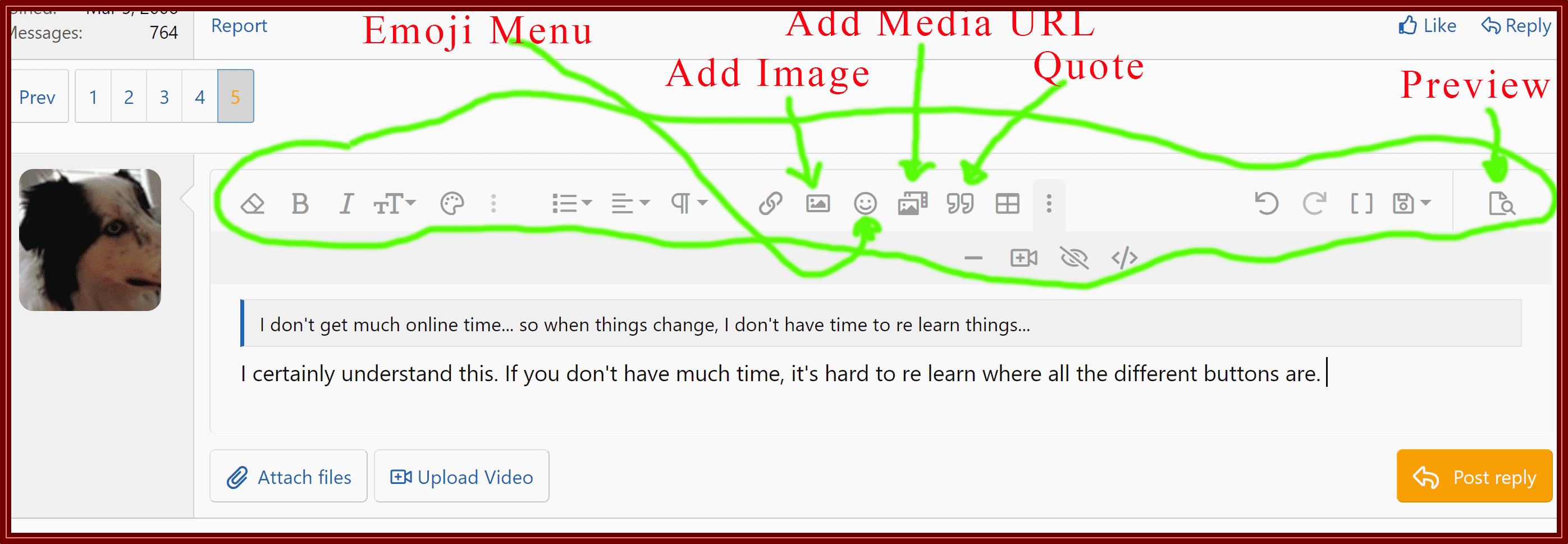
Here, look at this image. I took a screenshot real quick.
Screenshot (14).png


I took a screen shot and added some quick instructions. But that grey row of icons is your friend on a desktop. I haven't looked at this on an ipad yet. On the left you can format the text, different colors, size etc. The Three dots are more options, if you want to change fonts for example. The Spoiler is kind of neat. With your mouse, click on the blurred out section of text. But I'm not sure what it would be for.

Anyway, the middle of the section is the emoji menu, add image add media and quotes. The grid is if you want to add a table. I suppose that could be helpful with ballastics or something. Then the preview is over to the far right.

Hope this helps some.
 
And after you hit the Post Reply button, then you have these three choices. I've seen people ask about the edit and delete buttons. They show up here.
RugerScreenShot.jpg
 
And if you ask me, this new style is lightyears ahead of what we use to have. (y) The hundreds of emojis for everyone... Or the way it shows the youtube clip right here in the rugerforum page, it doesn't take you to the youtube website on another browser tab.

Anyway, after taking the dog for a quick walk and thinking about the above screenshots; the user experience has definitely been elevated. Thanks,
 
I tried to log in multiple times and it would allow me too. I got an email from Angie and she said she fixed it. Never worked for me and I had to change my log in.
 
I just go with the flow. It’s all ( anything computer related ) Greek to me. I’m 70 trips around the sun so I didn’t grow up around this stuff. I’m sure the powers at be deemed it necessary. Above my pay grade anyway.
Thanks for the hard work.
Wilbur
 
One new "feature" is if you are going to look at a thread, the software (seemingly)
uses an arbitrary algorithm to decide WHERE in the thread you will start looking at it!

I will let it know WHERE I want to start. Be it the beginning, or some portion further
into it (more than one page of posts).

YMMV
 

Latest posts

Back
Top